Title Back Colour Keyoti Title Line Title Curve Title Right
Blue Box Top

Spell Checking for WPF Apps.

RapidSpell WPF v3.0.1
free trialbuy now
Blue Box Bottom

Blue Box Top
Overview
Support Forum
Licensing
Dictionaries
Screenshots
Documentation
Version History
FAQ
Upgrade


Home >  WPF Controls >  RapidSpell WPF

What Sets It Apart
Light Blue Background

Integrated As You Type and Dialog Checking
Open API
Extremely Customizable
Auto Correct
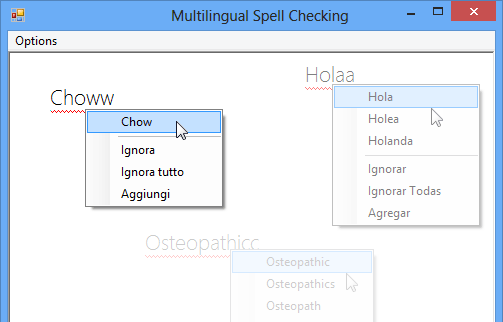
Multiple Languages Supported
Play RapidSpell WPF video
Phone
1 877 453 9684
+1 250 941 6545
Email
Support Forum
Office hours:
9am - 5pm PT (GMT-8)

Light Blue Background

Add as-you-type and dialog spell checking to your WPF applications.

RapidSpell WPF spell checker can be integrated in to any application to provide a fully independent and highly customizable spell checking control. RapidSpell WPF also includes a core spelling control for checking strings. Written exclusively for WPF, RapidSpell includes 4 English dictionaries and multiple other dictionaries are available (including medical).
Product overview image

Download the free evaluation and see how easy it can be to add as-you-type and dialog spell checking to your WPF applications.

General Details
Light Blue Background

RapidSpell WPF is made up of 3 spell checking controls; RapidSpellDialog for dialog based spell checking, RapidSpellAsYouType for as-you-type spell checking and RapidSpellChecker the engine for spell checking strings.


RapidSpell WPF as-you-type

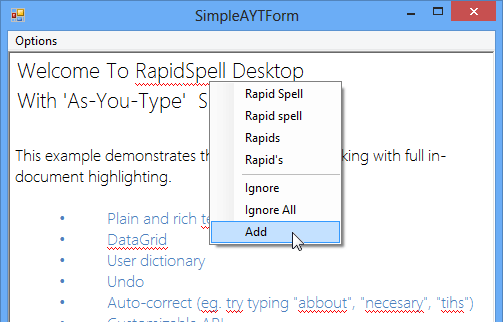
Spelling mistakes are highlighted as the user enters text. Using the right mouse button on a highlighted word displays a context menu with suggested corrections and options to ignore or add the word to the user dictionary. Includes Autocorrect functionality for English - common spelling mistakes can be automatically corrected based on a customizable hashtable. Works with TextBox and RichTextBox. Only one instance of RapidSpellAsYouType is needed for all text boxes on a form.

RapidSpell WPF dialog spell checker

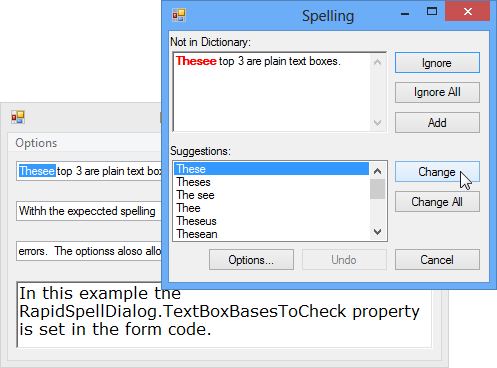
RapidSpellDialog has all the features of a standard spell checker - allowing you to add words to the user dictionary, undo the last operation, edit user options, change to the suggested word, change all matches to the suggested word, ignore a spelling error, ignore all matches, smart suggestions and double word detection. RapidSpellDialog can check a selection of text, whole documents, and allows manual alterations. The user can alter the main document while the dialog spell checking is in progress.

RapidSpell WPF Options form

RapidSpell WPF provides a customizable options form enabling users to alter general spell checking behavior such as ignoring email addresses, checking spelling as-you-type, ignoring words with number etc. The contents of the user's personal dictionary can also be viewed and edited (if enabled).

RapidSpellChecker is the engine in the API, it can be used to spell check strings and can form the basis of a custom user experience.

RapidSpell WPF Dict Manager

The Dict Manager tool for RapidSpell WPF allows developers to customize the main dictionaries being used. Check whether words are included in the dictionary, remove words, merge word lists or create your own dictionaries from scratch.

Technical
Light Blue Background

By working with the UI XAML within the Visual Studio designer, developers can completely customize the dialog user interface. An open API was engineered to allow designers to easily alter the appearance of the spell checker. The behavior of the GUI can be customized by modifying the XAML codebehind or the presenter class (through subclassing).

Each control can be setup to check more than one text box on the same WPF form - increasing efficiency and reducing development time.

RapidSpell WPF was designed to Microsoft WPF 3.0, 3.5, 4.0 specification, and fully supports Visual Studio .NET 2008 and 2010.


Light Blue Background

Download RapidSpell WPF

Also available, RapidSpell for: .NET Win Forms
ASP.NET
Silverlight
Web Java (JSP)
Desktop Java (Swing)

Questions?

Light blue background
Blue Box Bottom


About | Contact | Site Map | Privacy Policy

Copyright © 2002- Keyoti Inc.